
A Shopify client wanted to make their free shipping threshold more visible. They originally approached me to add a simple ‘Spend another £X to get free shipping!’ messages to their cart drawer & cart page. They also wanted some ideas to draw attention to their loyalty programme, particularly for new customers, potentially with additional banners or messaging in the cart, but they didn’t have a specific solution and were open to suggestions.
I recommended that we roll both ideas into the same function; rather than the simple text version of a ‘free shipping’ countdown, I suggested a more gamified version, with an animated slider that updates in real-time as the users cart total increases towards the £100 free shipping threshold. At my suggestion, the client also agreed to offer some additional bonus points for orders over £50 and £150, giving customers a total of three evenly-spaced ‘cart goals’ they could unlock, along with a pleasing dopamine for achieving each goal.
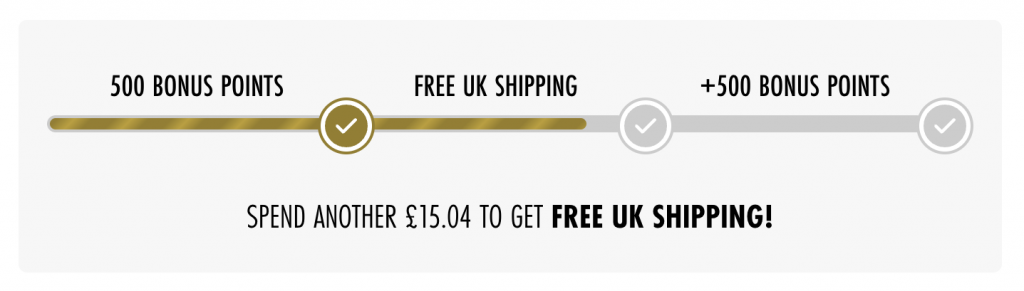
The Problem
As a global retailer, the client had three separate websites that would feature the new Cart Goals section, each with different thresholds and potentially different rewards.
Free shipping would only be available in certain countries, against changing from storefront to storefront, so they needed a simple way to restrict the block to certain locations. This information could change in future, so it needed to be easily accessible.
They also might be in a situation where they have more or fewer cart goals active at any time, so the code needed to be flexible enough to handle 1-3 active cart goals without causing headaches.
The solution
First, let’s make the settings easy for the client to edit by adding it straight to their theme settings, which they can easily access through Shopify’s familiar Edit Theme mode. By going to the settings_schema.json file and adding a new ‘Cart Goals’ section, we can define everything they need to enable/disable the cart goals, set which countries can see the block, and add the name & threshold for each goal:
"name": "Cart Goals",
"settings": [
  {
    "type": "header",
    "content": "Cart Goals"
  },
  {
    "type": "checkbox",
    "id": "cart_goals_enable",
    "label": "Enable cart goals section.",
    "info": "Individual goals can be disabled by leaving their values blank"
  },
  {
    "type": "text",
    "id": "cart_goal_countries",
    "label": "Only show goals in these countries",
    "default": "GB, US, DE",
    "info": "Use ISO-2 country codes, comma-separated. Leave blank if unrestricted."
  },
  {
    "type": "header",
    "content": "Cart Goal 1"
  },
  {
    "type": "text",
    "id": "cart_goal_1_name",
    "label": "Goal 1 Name"
  },
  {
    "type": "number",
    "id": "cart_goal_1_threshold",
    "label": "Goal unlocks at:",
  "info": "Use cents format (i.e. £50.00 = 5000)"
  },
etc, etc.
With that done, we can get to the fun stuff. We’ll add a new cart-goals.liquid snippet to a test theme. Then we’ll need to wrap the whole thing in a IF statement that checks to see if they’re restricting it by country and, if so, whether the user’s current country is allowed:
{% assign allowed_countries = settings.cart_goal_countries | remove: ' ' %}
{% if allowed_countries == blank or allowed_countries contains localization.country.iso_code %}
   ...
{%- endif -%}
Now we’ll pull the goals into an array so we can loop through them later. We’ll need their names and thresholds:
{% assign goals = "" %}

{% if settings.cart_goal_1_name != blank %}
  {% assign goals = goals | append: settings.cart_goal_1_name | append: "," | append: settings.cart_goal_1_threshold %}
{% endif %}

{% if settings.cart_goal_2_name != blank %}
  {% assign goals = goals | append: "|" | append: settings.cart_goal_2_name | append: "," | append: settings.cart_goal_2_threshold %}
{% endif %}

{% if settings.cart_goal_3_name != blank %}
  {% assign goals = goals | append: "|" | append: settings.cart_goal_3_name | append: "," | append: settings.cart_goal_3_threshold %}
{% endif %}

{% assign goals = goals | split: "|" %}
We only want one goal to be active at a time, so we’ll need to loop through the array to check the user’s cart total and set each goal’s status – a goal can be locked (if a previous goal is still in progress), unlocked (if its threshold has been beaten), or, if neither of those apply, then it’ll be our active goal.
Let’s quickly define some variables that will be useful here, and create some divs to contain everything:
{% assign unlocked_so_far = true %}
{% assign current_goal = blank %}
{% assign next_threshold = 0 %}
{% assign cart_total = cart.total_price | plus: 0 %}

<div class="cart-goals__container">
  <div class="cart_goals">
    ...
  </div>
</div>
With that done, we can start looping through our goals. Loop through our array, grabbing the name & threshold data from each. We can then check each threshold against the user’s cart total to see if that goal is unlocked, and check to see if the ‘unlocked_so_far’ variable has been tripped to ‘false’ (meaning this is our first non-beaten goal and so it should be active). If neither of those apply, then the goal is still locked:
{% for goal in goals %}
  {% assign parts = goal | split: "," %}
  {% assign goal_name = parts[0] %}
  {% assign goal_threshold = parts[1] | plus: 0 %}

  {% if cart_total >= goal_threshold %}
    {% assign status = "unlocked" %}
  {% elsif unlocked_so_far %}
    {% assign status = "in_progress" %}
    {% if current_goal == blank %}
      {% assign current_goal = goal_name %}
      {% assign next_threshold = goal_threshold %}
    {% endif %}
    {% assign unlocked_so_far = false %}
  {% else %}
    {% assign status = "locked" %}
    {% assign unlocked_so_far = false %}
{% endif %}
So far so good. To ensure the frontend design is evenly spaced (even if the goal thresholds are irregular) I’m planning to have one progress bar for each goal, using some sleight of hand and a well-placed SVG icon to make it look like one, continuous bar.
A completed goal’s progress bar will need a width of 100%, while a locked goal will need to be 0%. For the current goal’s bar, we can simply calculate the users current cart total as a percentage of the goal’s threshold and set that as the width of the progress bar:
{% if goal_threshold > 0 %}
  {% assign progress = cart_total | times: 100 | divided_by: goal_threshold %}
{% else %}
  {% assign progress = 0 %}
{% endif %}

<div class="cart_goal goal_{{ forloop.index }} status_{{ status }}">
  <span>{{ goal_name }}</span>
  <div class="progress-bar-background">
    <div class="progress-bar"style="width:{% if status == 'unlocked' %}100%{% elsif status == 'locked' %}0%{% else %}{{ progress }}%{% endif %}">
    </div>
  </div>

    <svg width="20px" height="20px" viewBox="0 0 24 24" fill="none" xmlns="http://www.w3.org/2000/svg">
        ...
    </svg>
</div>

{% endfor %}
</div>
Almost there on the Liquid side of things. Our FOR loop is done, but we could use some messaging at the bottom of the div to help the user understand their current goal status or show a celebratory message if they’ve unlocked everything:
{% if current_goal == blank %}
    {% assign last_goal = goals | last | split: "," %}
    <div class="current_goal">
      You've unlocked <span class="current-goal__text">{{ last_goal[0] }}!</span>
    </div>
  {% else %}
    {% assign remaining = next_threshold | minus: cart_total %}
    <div class="current_goal">
      Spend another <span>{{ remaining | money }}</span>
      to get <span class="current-goal__text">{{ current_goal }}!</span>
    </div>
  {% endif %}
</div>
{% endif %}
And that’s it for the Liquid code! A bit of CSS to make it look good, along with some keyframe animations to bring it to life, and it’s almost ready to deploy. We just need to add some Javascript that replicates the goal logic, making the whole thing dynamic as users change their basket.
The first step depends on which theme you’re using, but most Shopify themes will have some version of a ‘cart:updated’ function, which outputs the full cart details whenever a cart update of any kind is triggered. You’ll want to make sure adding, incrementing, decrementing and deleting items are covered though, as some themes have distinct events for these. Check your theme docs or message the developers if you’re unsure.
You can also fetch cart.js and process the JSON data it sends back in a similar way – that’s a bit less performant though, so I’ve only added it as a fallback in case my theme-native version fails for any reason:
document.addEventListener('cart:updated', function (evt) {
  if (evt.detail && evt.detail.cart) {
    updateGoalsUI(evt.detail.cart.total_price);
  } else {
    updateCartGoals();
  }
});

function updateCartGoals() {
  fetch('/cart.js')
    .then(res => res.json())
    .then(cart => updateGoalsUI(cart.total_price))
    .catch(() => {});
}
Time to build our main function. First, we should give the JS an exit in case the container or our text elements don’t actually exist:
function updateGoalsUI(totalPrice) {
  const goalsContainer = document.querySelector('.cart-goals__container');
  if (!goalsContainer) return;
  const goalElements = goalsContainer.querySelectorAll('.cart_goal');
  const currentGoalTextEl = goalsContainer.querySelector('.current_goal');
  if (!goalElements.length) return;
Assuming everything does exist, we can take those goal elements and turn them into a nice, clean array. We’ll need to get the thresholds from the theme settings with some hybrid Liquid/JS:
const goalData = Array.from(goalElements).map(el => {
  const index = el.className.match(/goal_(\d)/)?.[1];
  return {
    el,
    index,
    name: el.querySelector('span')?.innerText.trim(),
    threshold: getThreshold(index),
  };
});

function getThreshold(index) {
  switch (index) {
    case '1': return {{ settings.cart_goal_1_threshold | default: 0 }};
    case '2': return {{ settings.cart_goal_2_threshold | default: 0 }};
    case '3': return {{ settings.cart_goal_3_threshold | default: 0 }};
    default: return 0;
  }
}
Now we need to process the goals. Our goals can change since the initial Liquid code ran, so the safest thing to do is reset each one to ‘locked’ to begin with, then run through the logic again. We’ll use a slice to compare the goal thresholds and the cart total, ensuring a goal can’t become active until the previous one has been fully unlocked, and then apply the relevant CSS class to each one:
goalData.forEach((goal, i) => {
  let status = 'locked';
  const prevThresholdsMet = goalData.slice(0, i).every(g => totalPrice >= g.threshold);
  if (totalPrice >= goal.threshold) {
    status = 'unlocked';
  } else if (prevThresholdsMet) {
    status = 'in_progress';
  }

  goal.el.classList.remove('status_locked', 'status_in_progress', 'status_unlocked');
  goal.el.classList.add(`status_${status}`);
Now we need to change the progress bars to make sure the widths get updated too. We’ll give the function an exit in case the bar doesn’t exist, then we’ll set it’s width based on the goal status and the cart total & threshold much like we did in Liquid:
  const bar = goal.el.querySelector('.progress-bar');
  if (!bar) return;

  if (status === 'unlocked') {
    bar.style.width = '100%';
  } else if (status === 'locked') {
    bar.style.width = '0%';
  } else {
    const pct = Math.min((totalPrice / goal.threshold) * 100, 100);
   bar.style.width = `${pct}%`;
  }
});
Okay. Now we want to update the messaging. We can check our goal data to get the current goal based on the cart total – if all goals have been unlocked we can show the final celebration message. If not, we calculate how much they need to spend to hit the next threshold and show that instead (due to Shopify’s cent-based pricing, we’ll need to divide that number by 100 and force it to two decimal places):
const currentGoal = goalData.find(
  g => totalPrice < g.threshold
);
if (!currentGoal) {
  const finalGoal = goalData[goalData.length - 1];
  currentGoalTextEl.innerHTML = `You've unlocked <span class="current-goal__text">${finalGoal.name}!</span>`;
  return;
}

const currentGoal = goalData.find(g => totalPrice < g.threshold);
  if (!currentGoal) {
    const finalGoal = goalData[goalData.length - 1];
    currentGoalTextEl.innerHTML =
      `You've unlocked <span class="current-goal__text">${finalGoal.name}!</span>`;
    return;
  }
  const remaining = ((currentGoal.threshold - totalPrice) / 100).toFixed(2);
  currentGoalTextEl.innerHTML =
    `Spend another <span>£${remaining}</span> to get ` +
    `<span class="current-goal__text">${currentGoal.name}!</span>`;
  }
And we’re all set! All we need to do is set something up to trigger the actual rewards – free shipping is easily handled through Shopify’s native shipping rules. In this case Shopify Flow was able to power the bonus loyalty points, but a myriad of different rewards are possible through Shopify’s automatic discounts or, with a bit more legwork, a custom Shopify Functions app.
With our new snippet ready, we can finally drop a render tag into the cart drawer & cart page, QA test everything and get it live.
The results
Results were immediately strong, with AOV increasing by an average of 11% as users felt more compelled to reach nearby thresholds and were actively rewarded for doing so. Their loyalty system had already proved popular, increasing customer retention rates by 17% even before the goals were added, and the additional bonus points provided further incentives for customers to keep engaging with the client’s stores.
The client was easily able to adjust the cart goals, rolling them out across their global stores with customised rules and thresholds to suit their business, and they intend to test different types of rewards for maximum impact.
Need to improve your conversion rate?
I can help. Hit the button below to book in a FREE 30-minute review where we can discuss your plans, and I’ll provide no-obligation thoughts & feedback.